


Quick answer: Stop copying call notes by hand. Suarify qualifies on the phone, calls avr_save_yes_no_lead, sends a WhatsApp summary, and your webhook opens a HubSpot or Bitrix24 deal with owner + pipeline stage.
Practical guide for Malaysian teams wiring Voice AI + WhatsApp + CRM — not theory.
Table of contents
1. Why this works in Malaysia
- Speed-to-lead dies when sales types notes after the call.
- Buyers want a WA paper trail (brochure, price band, next step).
- HubSpot/Bitrix only work if the deal exists with clean fields.
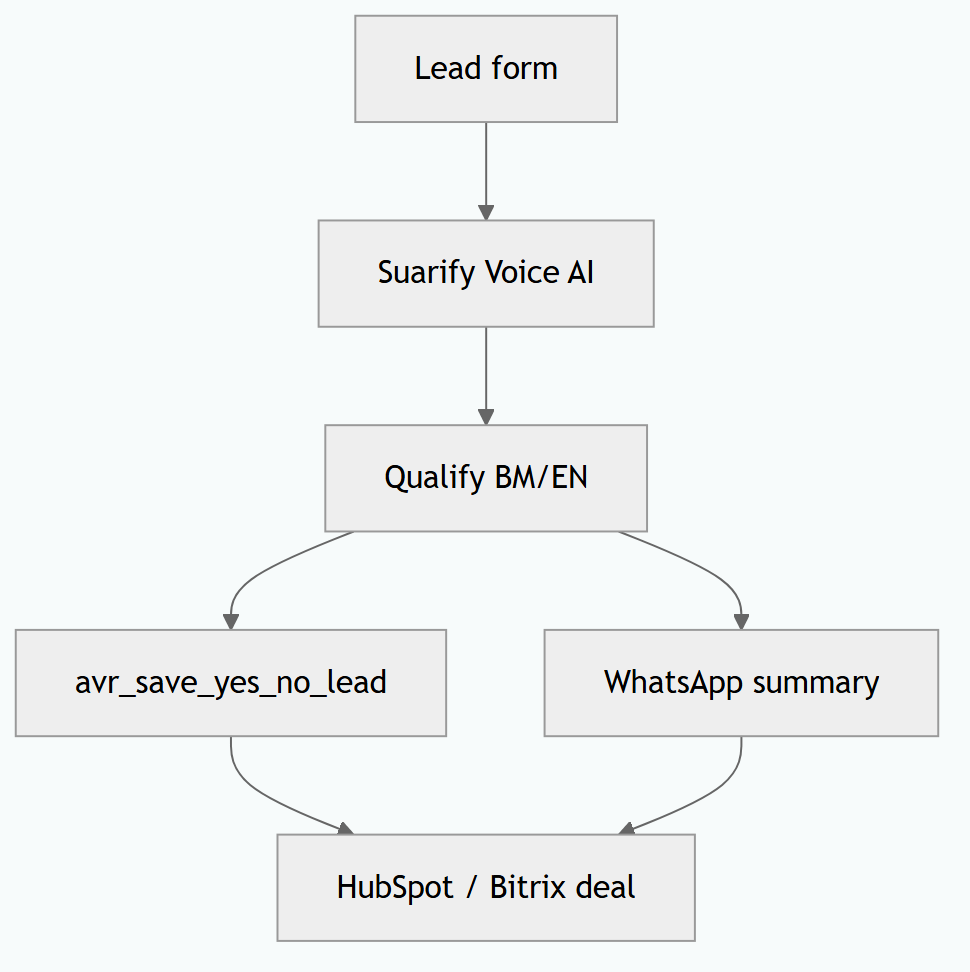
2. Step-by-step workflow
- Trigger: Meta lead, web form, or inbound inquiry → Voice AI dials / answers.
- Discovery in BM/EN: need, timeline, budget band, decision-maker.
- On clear answer →
avr_save_yes_no_lead(interest flag). - Send WhatsApp: summary + PDF/link + “Reply YA to confirm meeting”.
- Webhook → HubSpot deal / Bitrix24 deal: contact, properties, stage
Qualified — WA sent, assign owner. avr_hangupwhen done; human only on VIP / complex negotiation.
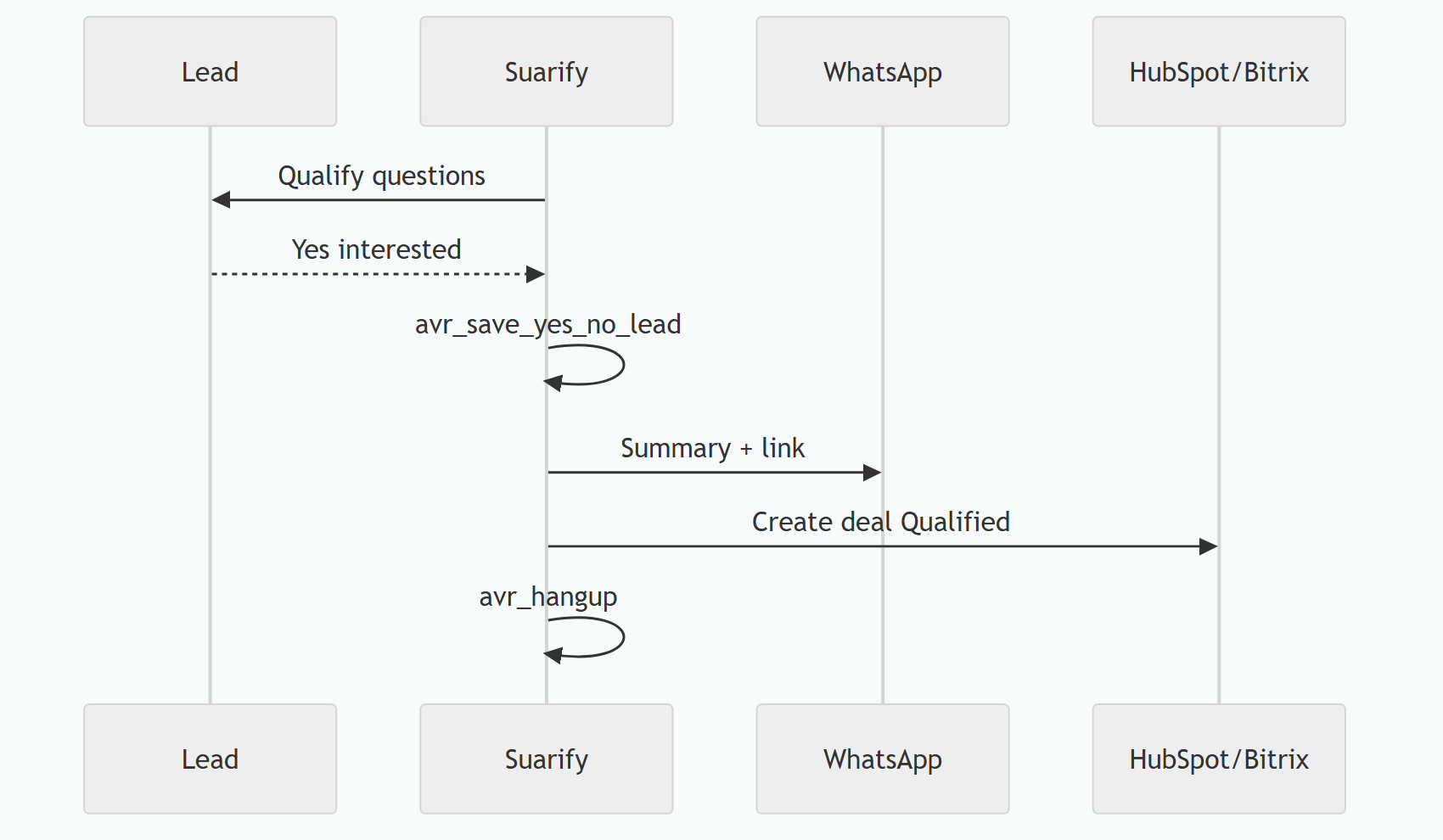
3. Integrations checklist
| Layer | What to connect |
|---|---|
| CRM deals (examples) | HubSpot Deals, Bitrix24 crm.deal.add, Zoho Deals, Salesforce Opportunities, Pipedrive, Freshsales, Twenty CRM (Suite Twenty) people/opportunities API, Plus CRM, EspoCRM |
| Rule of thumb | As long as the CRM exposes an API or inbound webhook, map phone → contact, yes/no interest → stage, WhatsApp thread → note/activity. Middleware (n8n / Make / custom) is fine |
avr_whatsapp_send_message mid-call or post-qualify |
|
| Lead source | Meta Lead Ads, TikTok forms, website, WhatsApp click-to-call |
| Middleware | n8n / Make / custom API on Suarify webhook |
Deep dive on tools: Suarify function calling.
4. Sample WhatsApp copy
Hi {name}, thanks for the call just now.
Summary: {need} · timeline {when} · budget band {band}.
Brochure: {link}
Reply *YA* to lock a 15-min meeting with our consultant.
Keep it short, PDPA-aware (don’t dump IC/policy numbers in the first blast), and brand-signed.
FAQ
How do I get a HubSpot or Bitrix deal without typing notes after every call?
Have the Voice AI qualify on the line, save interest with avr_save_yes_no_lead, send a WhatsApp summary the buyer can keep, then fire a webhook that creates the deal with stage and owner. Sales opens the CRM — the paperwork is already there.
Why send WhatsApp if we already spoke on the phone?
Malaysian buyers forward WA threads to spouses or bosses. A short summary + brochure link turns a verbal “maybe” into a shareable next step and a cleaner CRM timeline.
Do I need official WhatsApp Business API?
For reliable templates and scale, yes (WABA). Suarify uses your active WhatsApp connection — align with your provider’s rules.
HubSpot, Bitrix24, or Twenty CRM — which works?
Any CRM with an API. HubSpot and Bitrix24 are the usual Malaysia picks; Twenty CRM (Suite Twenty) works the same way via REST (create person/opportunity, patch stage). Zoho, Salesforce, Pipedrive, Freshsales, EspoCRM — same voice → WhatsApp → deal pattern.
Can we start without a full CRM project?
Yes. Log yes/no interest + WhatsApp first; add HubSpot/Bitrix deal create once the webhook is ready.
Related: Hotel PMS receptionist · Speed-to-lead · Healthcare scheduling ROI