

Building a custom voice AI agent that sounds genuinely human, responds instantly, and never misses a beat isn’t just about writing a good prompt. Behind the scenes at Suarify, we’ve engineered a high-performance infrastructure combining advanced caching, ultra-fast response times, and multi-provider backups.There are list of things we can do at different layers like infra, llm, appcode, server ,etc . In this article we focus mainly towards the perceived experience layer.

Whether you are designing a customer service line, an outbound sales assistant, or an automated coordinator, here are the 5 simple steps we use—and teach our community—to build bulletproof voice agents using FlowSuarify Designer.
Step 1: Craft the Persona and Prompt
Before touching any code, you need to define how your agent talks, handles interruptions, and switches between languages (like English, Bahasa Malaysia, and local slang).
- The Suarify Way: We teach you how to write clean prompts that dictate vocal tone and pacing rather than just text.
- Prompt Caching: To prevent the AI from lagging, Suarify caches core system prompts in memory. This means the agent instantly remembers its instructions on every turn without wasting precious milliseconds reloading them.
Step 2: Implement Voice and Profile Loading Caches
Slow startup times kill user engagement and trigger automated call filters.
- Instant Profile Pulls: When a call connects, Suarify instantly pulls user context and profile data from memory caches so the agent knows who is calling from the very first second.
- Audio Caching: Frequently used greetings and system responses are pre-rendered and cached locally, dropping initial response lag down to near zero.
Step 3: Optimize for Speed to Bypass Robocall and Voicemail Detectors
Carrier-side robocall filters and voicemail (VM) detectors listen specifically for unnatural pauses or slow initial response times to flag automated calls.
- Instantaneous Answers: Because we utilize voice and prompt caching, our response times happen in milliseconds.
- Human-Like Rhythm: By answering instantly with natural filler phrases, the system mimics real human behavior so accurately that security filters and VM detectors recognize it as a legitimate human interaction, keeping your calls connected.
Step 4: Design Your Flow Visually with FlowSuarify Designer
Complex branching conversations, error recovery, and backtracking can get messy quickly.
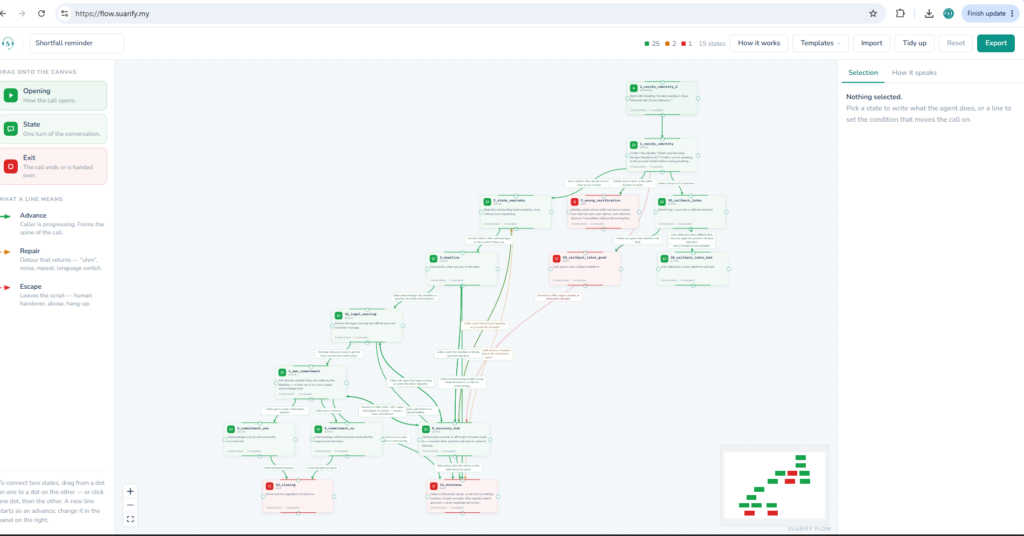
- Visual Drag-and-Drop: We built FlowSuarify Designer to democratize voice design. You don’t need to write complex backend code to manage how an agent recovers from a user changing their mind halfway through a sentence.
- Easy Customization: Creators and businesses can easily map out conversation paths, test different voice tempos, and set up smooth fallback loops step-by-step.
- Transition sounds: We can also load TTS sounds for perceive buffer thinking (eg hold on let me think, keyboard typing , music etc)
Step 5: Choose Alternative Providers and Multi-Provider Integration as a Backup
Relying entirely on a single AI voice or LLM provider leaves your operations vulnerable to unexpected API outages, rate limits, or regional network downtime.
- Seamless Failover Integration: A critical part of our design philosophy at Suarify is integrating secondary and alternative voice/LLM providers as automated backups.
- Uninterrupted Operations: If your primary voice provider experiences a spike in latency or a service drop, the system instantly and silently routes the call traffic to your backup provider. This ensures your voice agents stay live, responsive, and reliable 24/7.